
Dead or Alive? Inferring Room Occupancy Without Guessing
In 1935, the physicist Erwin Schrödinger described a thought experiment that has haunted science ever since. A cat is placed in a sealed box with a radioactive atom. Until you open the box, the cat is simultaneously alive and dead. The act of observation collapses the uncertainty into a single definitive answer.
Your Home Assistant occupancy detection system has the same problem. Every room in your home is Schrödinger’s room. The door is closed. Is anyone in there? Your motion sensor went idle ten minutes ago. Does that mean the room is empty, or does it mean someone is sitting perfectly still on the couch? Without opening the door, without an act of observation, you cannot know.
Most home automation systems guess. They set a timer, wait for motion to clear, and assume the room is empty. Sometimes they are right. Often they are not. The light turns off on someone reading a book. The HVAC shuts down on someone working quietly at a desk. The system mistakes stillness for absence.
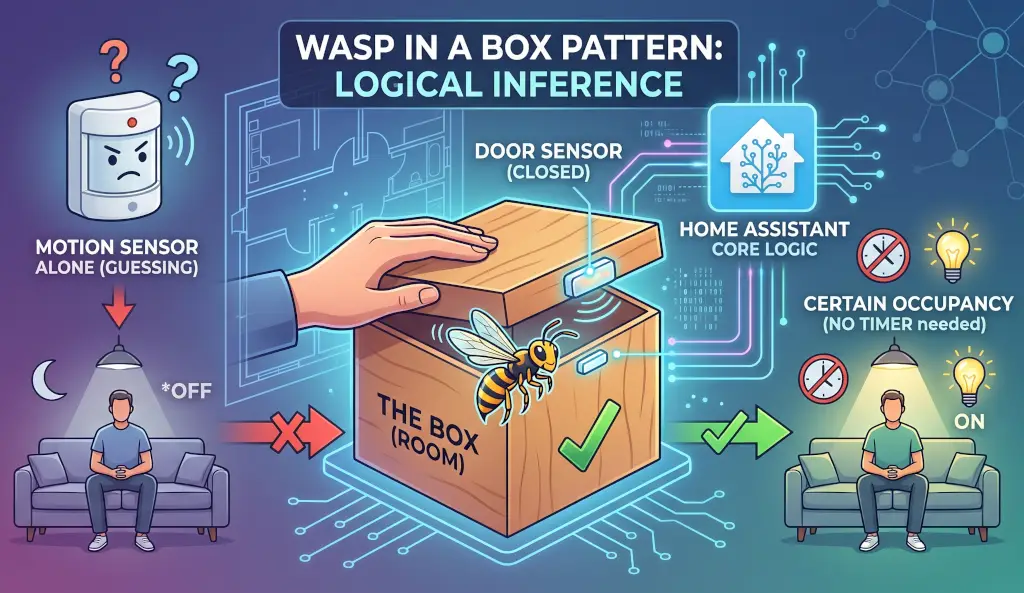
The wasp-in-a-box pattern solves this. It is a Home Assistant occupancy detection technique that uses a door sensor and a motion sensor together to infer presence with a level of certainty that a motion sensor alone can never achieve. This article explains the pattern, walks through the logic, and gives you a complete implementation you can deploy today.
Why Motion Sensors Alone Are Not Enough
A motion sensor answers one question: is there movement? It cannot answer the question that actually matters: is there a person?
PIR sensors detect heat changes moving across their field of view. That makes them sensitive to more than just people — sunlight tracking across a floor, a reflection off a window, a warm air current from a vent. They are also blind to anyone who stops moving. mmWave presence sensors are more sophisticated, detecting micro-movements like breathing to identify static presence. But their sensitivity is a double-edged sword. A subtle breeze moving a curtain, a ceiling fan on low, or an HVAC duct vibrating can produce false positives that have nothing to do with a human being.
The result is the same: you end up padding your timers to compensate for missed detections or chasing phantom triggers. A five-minute timer becomes fifteen minutes becomes thirty minutes. The Home Assistant occupancy detection automation becomes sluggish and imprecise. You stop trusting it.
The wasp-in-a-box pattern does not try to solve this by adjusting the timer. It changes the question entirely.
The Wasp-in-a-Box Pattern Explained
The name comes from a simple physical observation. If you put a wasp in a box and close the lid, the wasp is in the box. You do not need to see it. You do not need to hear it. The logic is inescapable: it went in, the lid closed, and it has not come out. The wasp is in the box.
Applied to Home Assistant occupancy detection, the logic is elegantly simple. Someone enters the room. The light comes on. The door closes behind them. At that moment, the system knows something it cannot know from a motion sensor alone: a person went in and has not come out. The light stays on. It does not matter whether the occupant moves, reads, sleeps, or sits completely still. The wasp is in the box. The light stays on until the door opens again.
The wasp-in-a-box pattern works precisely because the door is the observable boundary of the space. It is the act of observation that Schrödinger was missing. The room with an open door is uncertain. The room with a closed door and a confirmed occupant inside is not. The state machine below translates that physical reality into automation logic.
Where This Pattern Works Best
The wasp-in-a-box pattern is not a universal solution for Home Assistant occupancy detection. It works best in rooms with a door that defines a clear boundary between inside and outside.
Ideal Rooms for Inferring Room Occupancy:
- Office or Study – single door, occupant typically seated and still for long periods
- Bathroom – single door, false negatives from PIR sensors are most disruptive here
- Bedroom – single door, the pattern handles sleeping occupants cleanly
Rooms Not Suitable for Inferring Room Occupancy:
- Living Rooms, Great Rooms, or Open-Plan Spaces – no door to close, no boundary to define
- Kitchens that Open into Dining or Living Areas – too many through-traffic paths
- Hallways – no meaningful occupancy state to infer
Where the pattern genuinely breaks down is in rooms with no doors at all, or spaces that flow openly into other areas. If there is no door to close, there is no box to trap the wasp in. For open-plan spaces, standard timer-based motion logic is the better tool. Reserve the wasp-in-a-box pattern for enclosed rooms where a door defines the boundary of the space.
The State Machine
Before looking at the code, it helps to understand the states the room can be in and the logic that drives each transition.
Unoccupied, Door Open. Motion turns the light on and starts the timer. If motion clears and the timer finishes without a wasp capture, light off. Standard behavior.
Occupied, Door Closed – Wasp Captured. Someone enters. Motion is detected. The light turns on and the timer starts. The door closes. Before the timer finishes, motion is detected again — the occupant has moved. At this point the timer is cancelled entirely and the wasp hold boolean is set to true. No timer is running. The light stays on indefinitely regardless of whether the occupant remains completely still. The only thing that releases the wasp is the door opening again.
Door Closed, Manual Override Ative. The occupant physically turned the light off. The wasp hold is released and the manual override boolean is set. Motion is suppressed for 5 seconds to allow the occupant to leave without re-triggering the sensor. The override clears when the door opens or when the human physically turns the light back on — whichever comes first.
Door Opens — Clean Slate. Everything resets. Wasp hold off. Override cleared. Timer starts if the light is on. Timer cancelled if the light is off. The room begins fresh.
The Three Helpers
Before deploying, create these helpers in Home Assistant:
timer.office_occupancy_timer– duration 5 minutes. Handles auto-off when the room is unoccupied and the door is open.input_boolean.office_wasp_hold– the wasp capture state. On means someone is inferred inside with the door closed.input_boolean.office_manual_override– the human intent state. On means a human explicitly turned the light off and motion should not override that decision.
Adjust the timer duration to match your room. A bathroom might be 3 minutes. An office might be 10.
The Key Logic in Practice
The full automation is on GitHub at the link at the end of this article. Here are the key snippets that carry the wasp-in-a-box pattern.
Capturing the Wasp – Door Closes While Motion is Active:
yaml
# Home Assistant occupancy detection, Inferring Room Occupancy
# Capture the Wasp: Door closed + motion active = someone is inside
- alias: Door Closed — Capture Wasp if Motion Active
  conditions:
    - condition: trigger
      id: door_closed
  sequence:
    - alias: Wait for Motion to Settle
      delay: "00:00:05"
    - alias: Capture Wasp if Motion Detected
      if:
        - condition: state
          entity_id: binary_sensor.motion_office
          state: "on"
      then:
        - alias: Cancel Timer — Wasp is Captured, No Timeout Needed
          action: timer.cancel
          target:
            entity_id: timer.office_occupancy_timer
        - alias: Set Wasp Hold — Room is Occupied
          action: input_boolean.turn_on
          target:
            entity_id: input_boolean.office_wasp_hold
      else:
        - alias: No Motion — Room is Empty, Turn Off Light
          action: timer.cancel
          target:
            entity_id: timer.office_occupancy_timer
        - action: switch.turn_off
          target:
            entity_id: switch.office_lights
The timer is cancelled, not restarted. That is the core distinction of the wasp-in-a-box pattern. The occupant is confirmed inside. There is no need for a countdown.
Releasing the Wasp – Door Opens:
yaml
# Home Assistant occupancy detection: door open is a clean slate
# Wasp released, override cleared, timer starts if light is on
- alias: Door Opened — Release Wasp and Clear Override
  conditions:
    - condition: trigger
      id: door_opened
  sequence:
    - action: input_boolean.turn_off
      target:
        entity_id: input_boolean.office_wasp_hold
    - action: input_boolean.turn_off
      target:
        entity_id: input_boolean.office_manual_override
    - if:
        - condition: state
          entity_id: switch.office_lights
          state: "on"
      then:
        - action: timer.start
          target:
            entity_id: timer.office_occupancy_timer
      else:
        - action: timer.cancel
          target:
            entity_id: timer.office_occupancy_timer
The Motion Branch – Gated on Wasp Hold, Override, and Transient Filter:
yaml
# Home Assistant occupancy detection: motion only fires when appropriate
# Wasp off + override off + door open for more than 5 seconds
- alias: Motion Detected — Turn On Light and Start Timer
  conditions:
    - condition: trigger
      id: motion_detected
    - condition: state
      entity_id: input_boolean.office_wasp_hold
      state: "off"
    - condition: state
      entity_id: input_boolean.office_manual_override
      state: "off"
    - alias: Door Has Been Open for More Than 5 Seconds
      condition: template
      value_template: >-
        {{ (now() - states.binary_sensor.door_office_contact.last_changed)
           .total_seconds() > 5 }}
The 5-second door guard filters the transient motion that fires as an occupant walks out through an open door. Without it, the departing occupant would trigger the motion branch and turn the light back on as they leave.
The Manual Override – Built on Physical Switch Detection:
yaml
# Human physically turns light off -- respect that decision
# Uses three-condition context filter to confirm physical switch press
# See: https://xeazy.com/detect-a-physical-switch-press-in-home-assistant/
- alias: Manual Switch Off — Human Override
  conditions:
    - condition: trigger
      id: manual_switch_off
    - alias: Physical Switch — Not Triggered by Automation or Dashboard
      condition: template
      value_template: >-
        {{ trigger.to_state.context.parent_id is none and
           trigger.to_state.context.user_id is none and
           trigger.to_state.context.id is not none }}
  sequence:
    - action: timer.cancel
      target:
        entity_id: timer.office_occupancy_timer
    - action: input_boolean.turn_off
      target:
        entity_id: input_boolean.office_wasp_hold
    - action: input_boolean.turn_on
      target:
        entity_id: input_boolean.office_manual_override
The manual override uses the three-condition context filter from the previous article in this series. A physical wall switch press produces a unique context fingerprint — null parent, null user, present id — that no automation or dashboard tap can replicate. The override only fires when a human actually touched the switch. For the full explanation, see Did a Human Do That?
Known Limitations for Home Assistant Occupancy Detection
The wasp-in-a-box pattern is robust but not perfect.
The Motionless Occupant – If someone enters, the door closes, but the occupant never triggers motion again before the timer finishes, the wasp is never captured and the light will turn off. The occupant waves their arms or physically turns the light back on. From that point the wasp is re-captured on the next motion trigger with the door closed. This is the one scenario where the pattern falls back to standard timer behavior — but it recovers cleanly on the next interaction.
The Departing Occupant Who Closes the Door – If the door closes behind someone as they leave while motion is still briefly active from their exit, the wasp is captured incorrectly. The light will stay on in an empty room until the door opens again. The 5-second settle delay in the Door Closed branch mitigates this by sampling motion slightly after the door event rather than at the exact moment of closure.
The Wasp-in-a-Box Pattern: Putting It All Together
Schrödinger never actually put a cat in a box. The thought experiment was a critique of quantum theory, not a laboratory procedure. But the uncertainty it describes is real and in Home Assistant occupancy detection, that uncertainty has a cost. Lights that turn off on people. Automations that treat stillness as absence. Systems that guess instead of reason.
The wasp-in-a-box pattern does not eliminate uncertainty. It replaces the guess with a logical inference grounded in physical reality. The door closed while the occupant was active. The wasp is in the box. Until the door opens, the system holds that conclusion and acts on it with confidence.
The complete automation YAML, ready to import into Home Assistant, is in our GitHub Repository:
github.com/TheThinkingHome/Automations/blob/main/light_control_office_occupancy.yaml
Adapt the entity names to match your setup, create the three helpers, and deploy. The wasp-in-a-box pattern will change how you think about Home Assistant occupancy detection in every enclosed room you build from this point forward.
James Lander is the author of The Thinking Home and writes about sovereign, private, and reliable smart home systems at xeazy.com.