

Enforcing State Awareness on a Dumb Gate – An Expose on the Use of Home Assistant Packages
The gate protecting the perimeter of my home is dumb. I live in a small apartment building where each unit has its own gated parking space. I recently added an automatic gate opener which has made parking much easier. But electronically speaking, the opener is a single-celled organism with a 433MHz receiver and a motor. When I press the button on the remote, the gate opens. Press the button again, it closes. That is the extent of its cognitive ability. Not good enough for a smart home junky like me, so I turned to Home Assistant for this DIY smart gate opener project.
To integrate the gate opener into Home Assistant, I did the hardware equivalent of hot-wiring the remote. I scrounged up a spare Sonoff 4CH Pro R3 relay module and flashed it with Tasmota to keep control fully local. Then came the surgery. I soldered a couple of wires to the button of a spare 433MHz remote and wired them into the relay’s dry contacts. Finally, I parked the whole assembly in the kitchen cabinet above the stove, plugging it into the same outlet used by the range hood. It is hidden, readily accessible, and sits perfectly within range of the gate receiver.
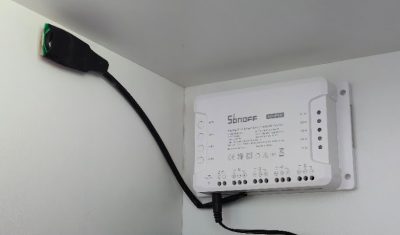
But this article isn’t about soldering. It isn’t about how to wire a relay. That part is easy or, at least, straightforward. (I can write a separate post on the hardware build if there is interest). The hard part is that even though Home Assistant can now open the gate, the gate is still dumb because there is no State Awareness, which is the ability of the system to know its current physical status (e.g., open or closed).
The Problem with Schrödinger’s Gate
A smart relay connected to the gate’s remote control creates a “Blind Toggle.” When you tap the button in Home Assistant, the relay clicks. The remote fires a signal. This is the fatal flaw of many basic smart gate opener tutorials; they teach you how to toggle the gate switch, but not how to build a truly smart gate with state awareness and enforcement.
Home Assistant has no idea what will happen next. Did the gate open? Was it already open? (If so, it is now closed). Did it hit a rock and freeze halfway? It is a digital guessing game while I want to know, with certainty, that the perimeter is secure.
I needed to turn this blind toggle into a smart entity. I needed a way to send specific ‘Open’ and ‘Close’ commands based on verified state awareness, rather than blind faith. Basically, I needed to build a command and control system from scratch.
The Tupperware of Home Assistant
If you use Home Assistant, you likely do most of your work in the User Interface (UI). It is now easy, intuitive, and efficient, but it fragments your logic. To build this gate guard, I needed an automation, two scripts, a few sensors, and some text helpers. In the UI, that means dancing between four different screens. You start writing the automation, realize you need a helper, exit the editor, create the helper, and forget what you were doing. It is clumsy.
The older method, “Split Configuration,” involved separate files for automations.yaml, scripts.yaml, and sensors.yaml. This was sufficient for code management but still required jumping between files to work on a single feature. If you wanted to share your project, you had to tell people to copy snippets into three or four different places.
The ‘Home Assistant Packages’ feature changes the rules. It allows you to group configuration by function rather than by type.
To enable it, you just need to add a few lines to your configuration.yaml file:
# Packages homeassistant: packages: !include_dir_named packages |
Next, create a subdirectory named packages inside your main config directory. You can place your package files in there. The only requirement is that they have a .yaml extension. I named mine gate_garage_guarded.yaml.
This feature allowed me to corral every stray bit of logic related to the gate: the sensors, the error handling, the interface, into that single file. It sits in a folder, self-contained and tidy. If I delete that file, the gate logic vanishes. If I edit it, I know I’m not breaking the bathroom lights. If I want to share it, the code is portable and far easier to manage.
It is just a file organization method, but it feels like finding out you can put your socks away, folded into pairs. That is why I’ve fallen in love with Home Assistant Packages.
Building the Logic
Once I had a clean canvas (literally, thanks to the new Home Assistant Canvas features), I decided to stop treating the gate like a switch. Instead, I structured the package like a military command center.
I built a package called Gate Garage Guard. You can grab the full code from my GitHub Repository, but here is the chain of command.
1. The General (Cover Entity)
In Home Assistant, I hid the Sonoff switch and replaced it with a template cover entity. This acts as the General. It is the only entity I interact with, either within my Home Assistant Dashboard or in an automation or script.
When I press “Close,” the General doesn’t just fire the relay. It executes a battle plan based on full state awareness:
- Check: Is the gate already closed? (If yes, abort. Do nothing).
- Fire: Trigger the relay (the dry contacts on the relay).
- Wait: The logic waits up to 15 seconds (my gate takes about 12 seconds to travel).
- Verify: If the Forward Observers don’t report “Closed” after the wait, it assumes the signal was missed. It fires again.
- Report: If it still fails? It latches an error message: Error: Close Failed.
2. The Forward Observers (Sensors)
A General is useless without eyes on the field. To cure Home Assistant’s blindness, I deployed hardware sensors as my Forward Observers. They do not make decisions; they simply report what they see.
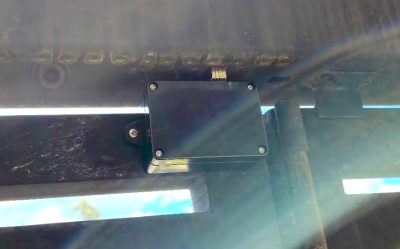
- Contact Sensor: This observer confirms the physical position of the gate. If I order an “Open” command, but this observer reports the gate is already open, the mission is aborted. This prevents the blind relay from toggling the gate closed when I intended to open it.
- Vibration Sensor: This observer watches for signs of tampering or forced entry. The problem is that this observer is jumpy. A heavy truck or a stiff wind coming down the Andes Mountains, where we live, will cause it to report contact. On its own, this sensor creates too much noise to be useful. So we have to temper it.
3. The Intelligence Analyst (Template Logic)
This is where the package shines. Raw field reports are often messy. If the General acted on every vibration report, we would be at constant high alert. I needed an Intelligence Analyst to filter the noise.
I created a “Smart” binary sensor inside the package. It reviews the reports from the vibration sensor. If the vibration is just a blip, the Analyst marks it as noise and ignores it. But if the vibration lasts for more than a few seconds, indicating someone is forcing the gate open or tampering with the motor, the Analyst flags a confirmed threat. This filters out the noise of daily life in Loja and passes only verified intel to the dashboard.
The Hardware Secret: Dry Contacts and Inching Mode
While the focus here is software, two hardware details make this logic possible. First, I used a Sonoff 4CH Pro because it offers dry contacts. This means the relay acts purely as a switch closing a circuit; it does not inject 110V or 12V power into the sensitive electronics of the remote control. Sending voltage into a remote designed for a 3V battery would fry it instantly.
Second, I configured Tasmota to use “inching” mode. Instead of toggling the relay ON and leaving it ON, inching sends a precise 1-second pulse and then automatically turns off. This perfectly simulates a human finger pressing and releasing the button, preventing the remote from draining its battery or spamming the gate receiver with a continuous signal.
Code Structure
You can see the full, 300+ line YAML file in the GitHub Repository. But rather than pasting that wall of text here, I want to show you the skeleton of how Home Assistant Packages are organized. It groups everything by domain, but keeps them all in one place.
# 1. INPUTS (Memory Banks) # Stores persistent status messages and error flags for the dashboard. input_text: gate_garage_package_status_message: # Displays “Opening…”, “Success”, etc. gate_garage_package_error_latch: # Stores “Error: Close Failed” until cleared. # 2. TEMPLATES (The Nervous System) # Defines the Error Display and the filtered “Smart” Vibration sensor. template: – sensor: – name: “Gate Garage Package Error Display” # The dashboard warning light. – binary_sensor: – name: “Gate Garage Package Vibration Guarded” # The raw vibration signal. – name: “Gate Garage Package Vibration Smart” # The filtered “Intelligence Analyst.” – trigger: – sensor: “Gate Garage Package Last Vibration Time” # Timestamp of last verified threat. – sensor: “Gate Garage Package Last Opened Time” # Timestamp of last successful open. # 3. THE ENTITY (The User Interface) # The main cover entity that acts as “The General.” cover: – name: “Gate Garage Package Guarded” # Calls the manager script for Open/Close/Stop actions. open_cover: action: script.gate_garage_package_manager data: command: ‘open’ # ‘close’ and ‘toggle’ commands are also supported. # 4. SCRIPTS (The Logic Engine) # The complex “Check, Fire, Wait, Verify” logic. script: gate_garage_package_manager: # The decision maker (checks state before acting). gate_garage_package_actuate_and_verify: # The muscle (fires relay, waits, retries). # 5. AUTOMATIONS (Maintenance) # Watchdog to warn if sensors go offline. automation: – alias: “Gate Garage Package Sensor Wake-up Monitor” # Alerts if sensors go silent > 24h. |
The Result
My dashboard is no longer cluttered with helper toggles and raw sensor readings. I have one clean entity: cover.gate_garage_package_guarded. Below it, a status line tells me exactly what is happening: “Processing Open…” or “System Ready.”
But the real victory isn’t just a cleaner interface. It is data. Because the package confirms the physical state, Home Assistant now actually knows if the gate is open or closed. It knows if the gate is jammed. It knows if the sensor is offline.
This opens up a world of automation that was impossible with a blind toggle. I can set security modes that refuse to arm if the gate is open. I can send actionable notifications to my phone if the gate has been left ajar for too long. I can trigger a ‘Code Red’ lighting scene if the vibration sensor detects a forced entry attempt. The data is real, verified, and actionable.
By triggering the remote rather than wiring directly into the motor board, we have not modified the gate opener itself. This is crucial. It keeps all of the gate’s native safety devices, like the obstruction beam and pressure sensors fully intact and operational. We are simply pressing the button electronically; the gate controller is still responsible for ensuring it doesn’t crush anything.
It turned a dumb, clicking relay into a smart, responsive entry system. If you are building your own DIY smart gate opener, don’t just settle for a switch, build a system that is state aware. This Home Assistant Package takes a piece of hardware that is volatile and chaotic, prone to errors and blindness, and wraps it in logic that brings order and accountability. And best of all, it all lives in one file.
My gate is still dumb. But, at least, now it is well-managed. You can find the full YAML package for the Gate Garage Guard on my GitHub: Gate Garage Guarded Package.
If you enjoyed this deep dive into gate automation and want to explore more Home Assistant projects—from climate control to security integration—check out my full Home Assistant Archive. I regularly post about sensors, scripts, and the automations that keep my home running.